> For the complete documentation index, see [llms.txt](https://aerogcs-green-docs.aeromegh.com/llms.txt). Markdown versions of documentation pages are available by appending `.md` to page URLs; this page is available as [Markdown](https://aerogcs-green-docs.aeromegh.com/12.-obstacle-avoidance/12.3-edit-obstacles.md).
# 12.3 Edit Obstacles
This feature allows the user to define obstacles on the plot. Follow the on-screen instructions for guidance. After defining an obstacle, tap the "**Save Obs**" button to store the plot, as shown below:
Edit obstacle
**Step 1: Accessing the Obstacle Interface**
* **Access the Obstacle Interface** by tapping the "**Obstacle**" button from the plot view.
Obstacle interface
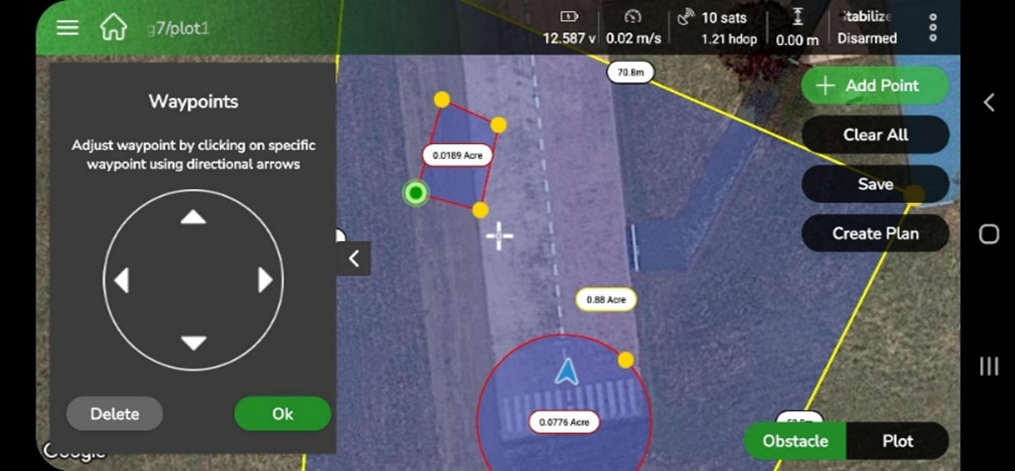
**Step 2: Modifying a "Polygon" Type Obstacle**
To modify a polygon obstacle:
1. **Select the Waypoint**: Tap the desired waypoint. It will be highlighted in **green** to indicate selection.
2. **Adjust the Waypoint**: Use the **Waypoint Editor** widget to reposition the waypoint along the **X-axis** or **Y-axis** with the directional arrows.
3. **Confirm Modifications**: Tap "**OK**" to apply the changes
**Step 3: Deleting a Waypoint**
To delete a waypoint:
1. **Select the Waypoint**: Tap the waypoint to delete.
2. **Execute Deletion**: Press the **Delete** button within the **Waypoint Widget.**
**Step 4: Modifying a "Circle" Type Obstacle**
To modify a circle obstacle:
1. **Select a Boundary Point**: Tap a point on the circumference of the circle.
2. **Resize the Circle**: Move the point:
* **Inward** to decrease the radius.
* **Outward** to increase the radius.
3. **Confirm Modifications**: Tap "**OK**" to finalize the adjustments
**Step 5: Saving Changes**
After completing all modifications, tap "**Save** **Obs**" to commit the updates to the plot.